
WorkFuz Pro
About WorkFuz Pro
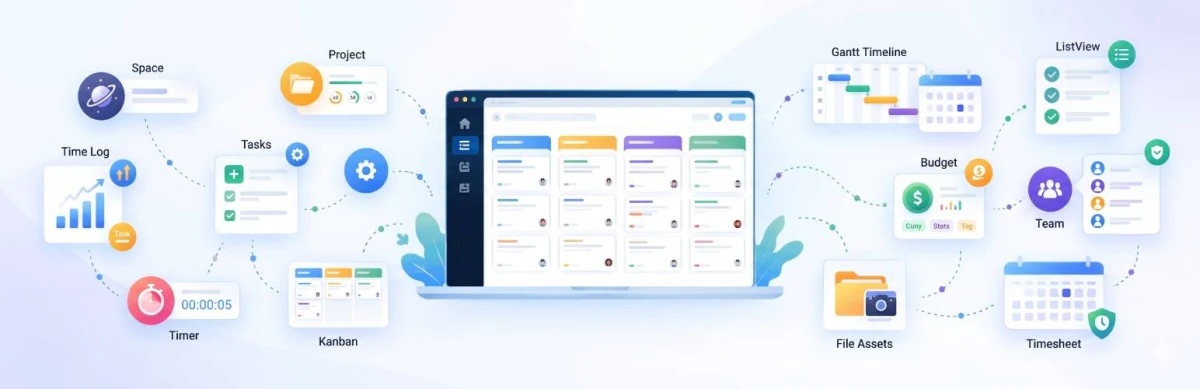
WorkFuz Pro elevates WordPress into a comprehensive project delivery and client operations platform. Built specifically for growing agencies, IT consultancies, and digital service firms, it replaces disconnected external tracking software with a native, server-authoritative engine.
With WorkFuz Pro, teams manage complex project timelines, monitor resource workloads, log billable hours, secure verified client approvals, and resolve support requests—all under your own brand, on your own infrastructure, with zero recurring per-user penalties.
Flexible Plans for Every Stage
Simple, transparent licensing with no hidden fees. Upgrade or renew anytime directly from your dashboard.
Starter
Renews at $29/yr (Locked Discount)
- 1 Website License
- 1 Year Updates & Support
Business
Renews at $99/yr (Locked Discount)
- 5 Websites License
- Priority Support
- All Pro Features Included
Agency
Renews at $299/yr (Locked Discount)
- 25 Websites License
- VIP Priority Support
- Multi-Client Deployment
Key Features & Architecture
Discover what makes WorkFuz Pro unique, reliable, and developer-friendly.
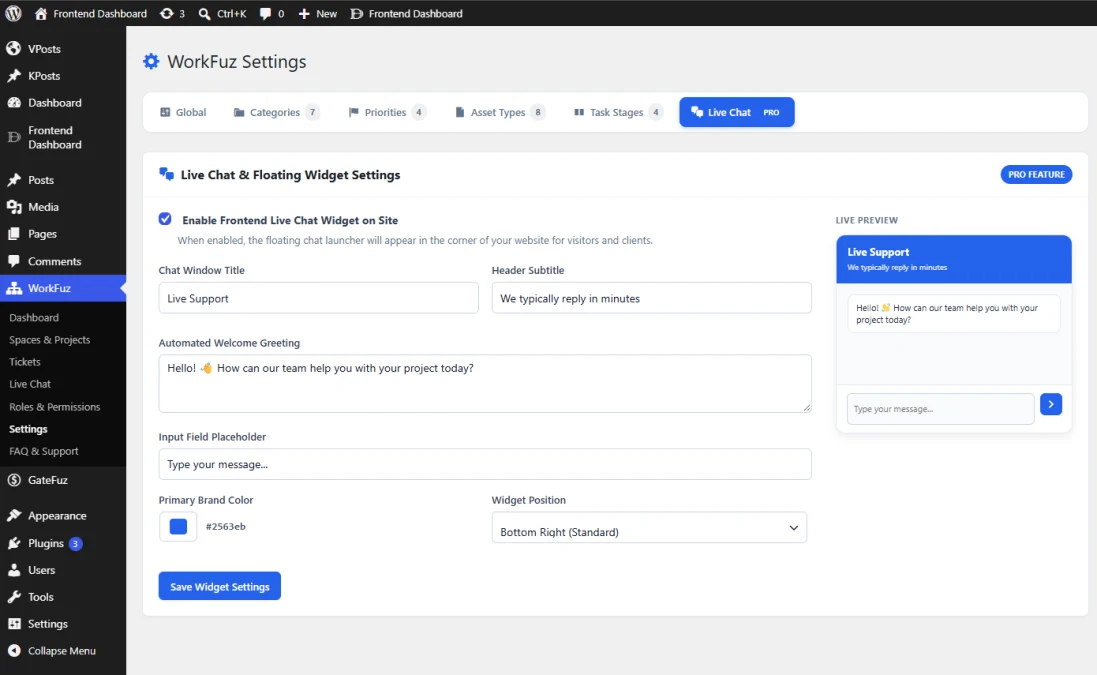
Live Chat Customizer & Pro Settings Hub
The Live Chat Customizer & Pro Settings Hub seamlessly extends the core WorkFuz settings engine when the Pro edition is active. It enables agency administrators to brand and configure the frontend customer live chat widget with zero coding, ensuring client interactions align perfectly with company branding.
- Pro-Exclusive Settings Tab: Injected cleanly into the central WorkFuz settings bar with a distinctive PRO badge indicator.
- 1-Click Frontend Widget Activation: Master toggle to enable or disable the floating client chat launcher across your entire website.
- Customizable Messaging & Typography: Tailor the Chat Window Title, Header Subtitles, Automated Welcome Greetings, and Input Field Placeholders to match your service tone.
- Brand Palette & Position Control: Native hex color picker to match the chat launcher and header with your brand theme, alongside dual position selection (Bottom Right or Bottom Left).
- Interactive Real-Time Preview: Live simulated widget on the settings panel that immediately reflects title, subtitle, greeting, placeholder, and color adjustments as you type.
Team Capacity & Resource Workload Heatmap
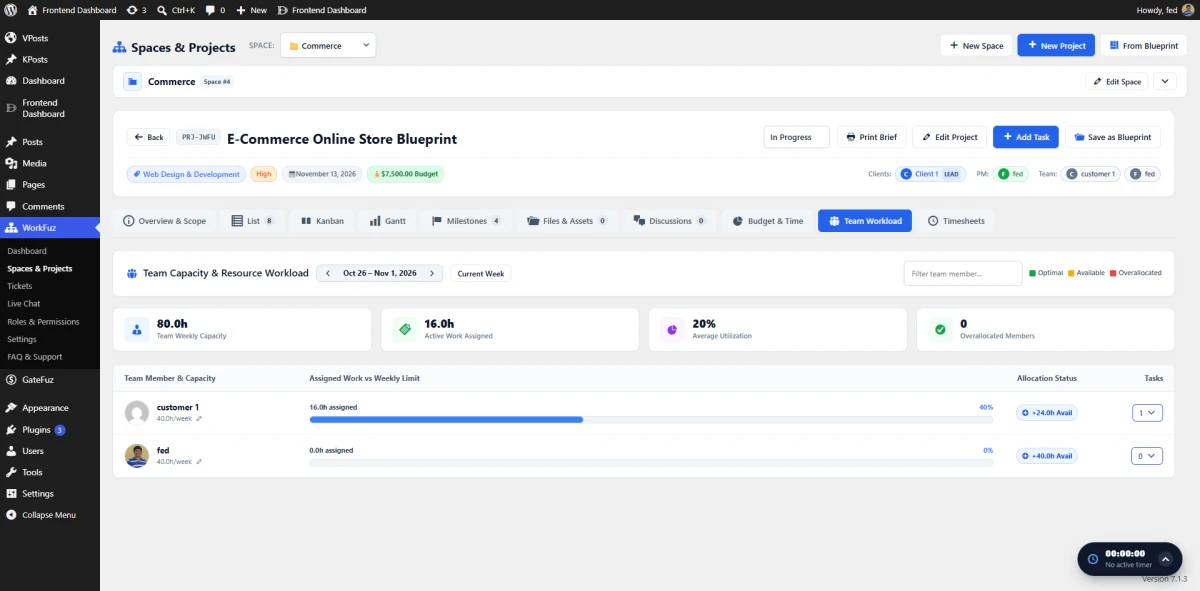
Prevent team burnout and optimize project staffing with the Team Capacity & Resource Workload Heatmap. Embedded directly within your Project Workspace, this analytical dashboard compares allocated task hours against individual team member availability to ensure realistic timelines and balanced workloads across active projects.
- Weekly Capacity Rollup Tiles: High-level metric tiles tracking Total Team Weekly Capacity (e.g., 80.0h), Active Work Assigned (16.0h), Average Team Utilization (20%), and Overallocated Members (0).
- Interactive Workload Timeline: Navigate forward and backward by weekly dates or reset instantly to the current week.
- Visual Utilization Progress Bars: Color-coded progress bars display each member's assigned hours against their weekly limit (e.g.,
16.0h assigned (40%)). - Live Availability Indicators: Status badges highlight available bandwidth (e.g.,
+24.0h Available) or flag over-allocated contributors needing workload rebalancing. - Expandable Task Breakdown: Quick-collapse task counters display exactly which tasks and subtasks are allocated to each contributor for fast reassignment.
Agile Helpdesk & Support Tickets Board (SLA Radar & Task Escalation)
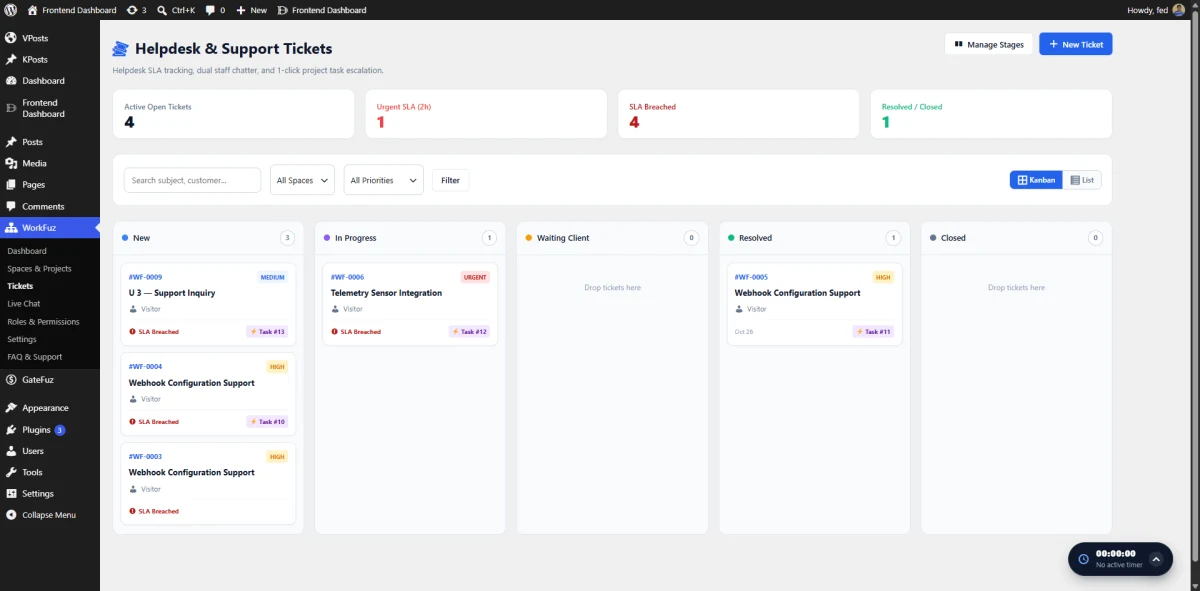
The Helpdesk & Support Tickets Board gives agency managers and support leads a visual, Kanban-style command center to track client requests from intake to resolution. With built-in SLA (Service Level Agreement) monitors, dual staff/client chatter, and direct links to development deliverables, your team can resolve bottlenecks before deadlines slip.
- Visual SLA Health Metrics: Real-time KPI tiles tracking Active Open Tickets, Urgent SLA Deadlines (e.g. 2h remaining), SLA Breaches, and Resolved/Closed totals.
- Drag-and-Drop Ticket Stages: Move tickets across customizable stages (New, In Progress, Waiting Client, Resolved, Closed) with instant database synchronization.
- Direct Project Task Escalation: Seamlessly escalate any support ticket into a formal project task with 1-click; escalated cards display direct clickable links back to the originating project task (e.g.,
⚡ Task #13). - Granular Ticket Cards: Scannable ticket cards displaying unique ticket codes (e.g.,
#WT-0009), customer names, priority badges (Urgent, High, Medium), and active SLA breach warnings. - Multi-Tenant Space & Priority Filtering: Isolate tickets by specific Space or Priority level, with instant search across ticket subjects and customer names.
Staff Live Chat Command Inbox & Escalation Hub
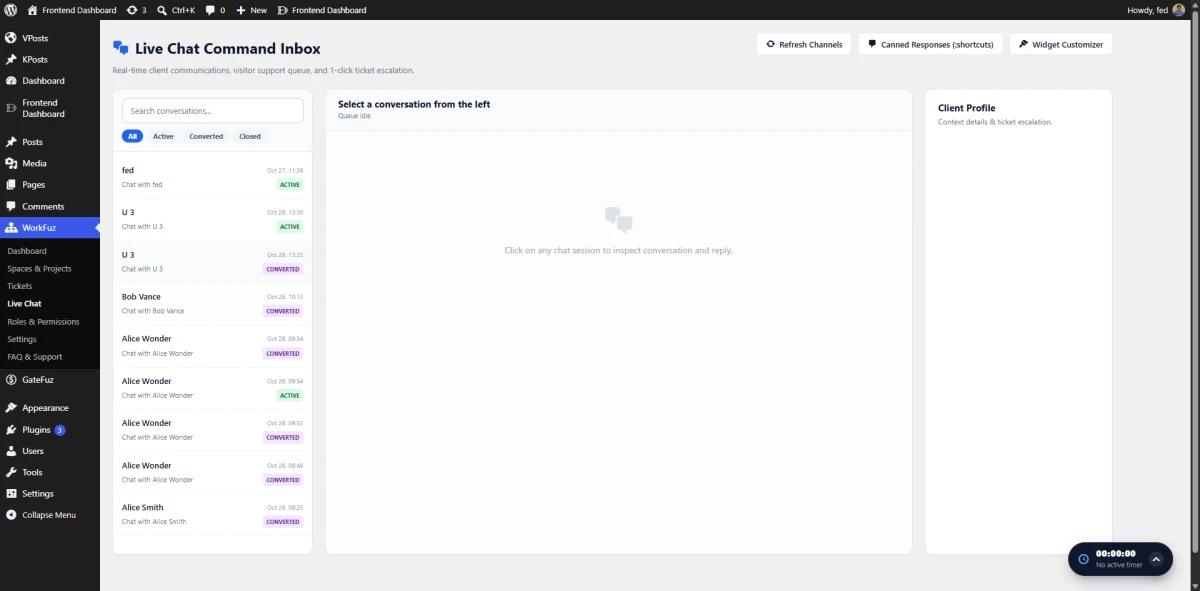
The Staff Live Chat Command Inbox is an administrative command center for support agents and project managers to manage client conversations at scale. With multi-channel queues, conversation filtering, and built-in escalation tools, teams can resolve inquiries rapidly or transition conversations into formal delivery tickets.
- Unified Multi-Channel Queue: Centralized left rail displaying real-time conversation queues categorized by Active, Converted, and Closed status badges.
- 1-Click Ticket Escalation: Seamlessly convert any live chat conversation into a formal Support Ticket with full transcript history intact.
- Canned Responses Engine: Pre-configure reusable shortcuts and templated macros to answer frequent client questions with consistent speed.
- In-App Widget Customizer: Launch the Live Chat Customizer modal directly from the inbox header to adjust brand colors, greetings, and positions on the fly.
- Client Context Pane: Dedicated right sidebar displaying user profile details, past inquiries, and related project assignments for informed conversations.
Self-Service Customer Support & Issues Portal
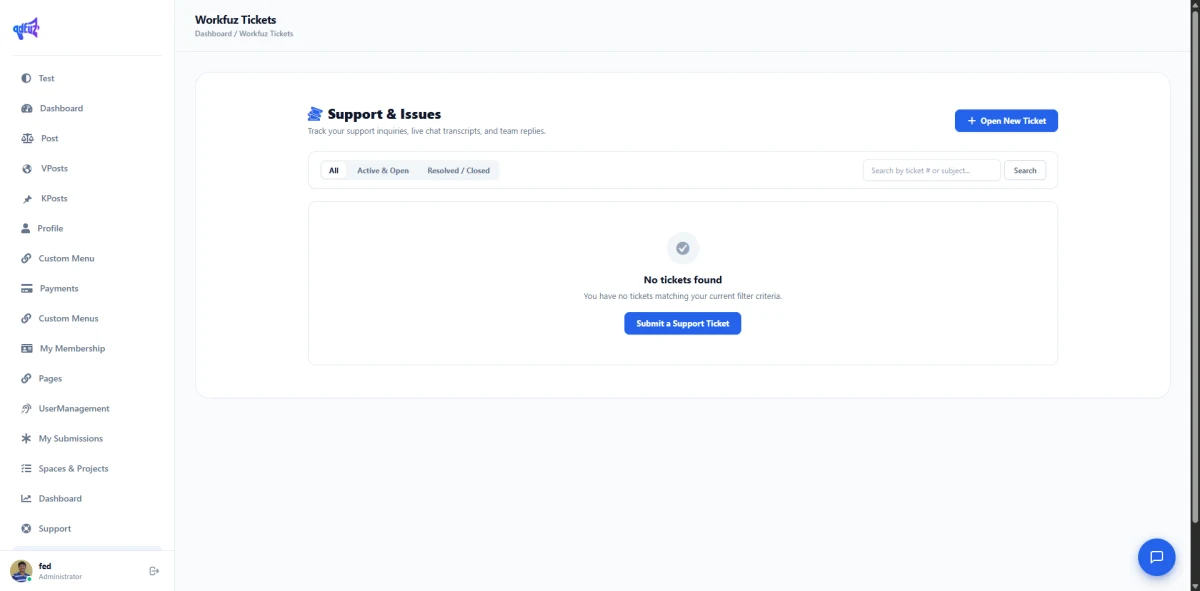
The Customer Support & Issues Portal provides clients with a dedicated self-service hub to submit inquiries, monitor issue resolutions, and review full transcripts of past interactions. Seamlessly embeddable via shortcode or Gutenberg block, this portal keeps client communications organized and accountable.
- Frontend Ticket Dashboard: Clean client view to manage all support requests without granting access to the WordPress admin dashboard (
/wp-admin/). - Interactive Status Filters: Filter inquiries instantly across All, Active & Open, and Resolved / Closed states, paired with instant text search.
- Self-Service Ticket Submission: Simple modal workflows for clients to raise new issues, categorize priorities, and attach relevant project details.
- Complete Transcript History: Retains historical replies, staff responses, and converted live chat transcripts in a clean, chronological thread.
- Native Frontend Dashboard Integration: Automatically adds a dedicated Support tab to user dashboards when Frontend Dashboard is active.
Client-Facing Floating Live Support Widget
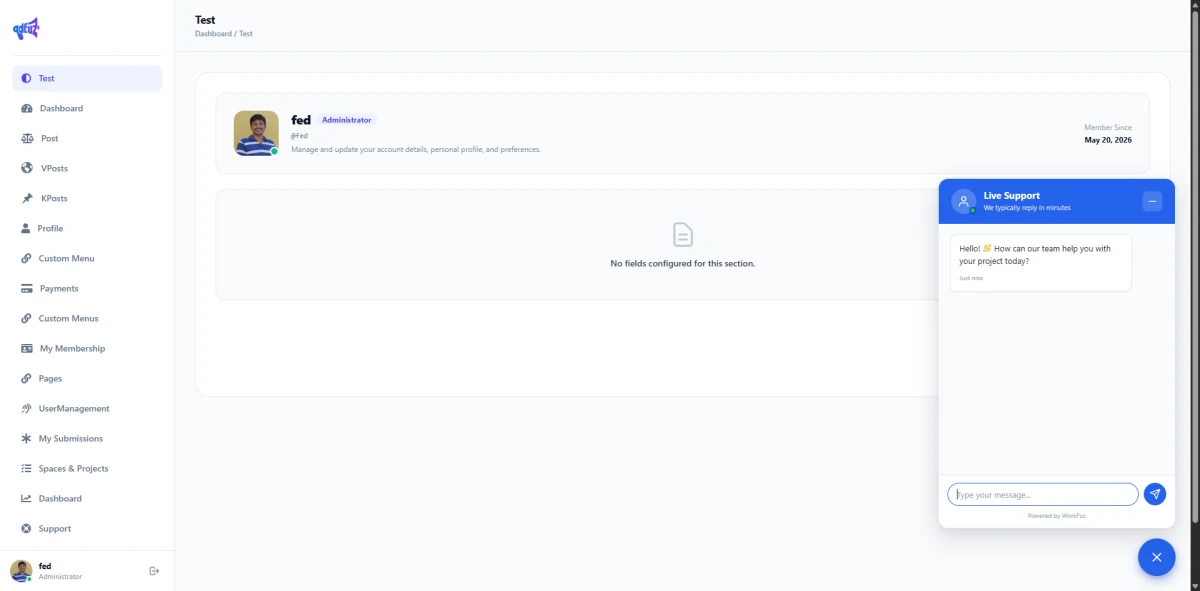
Deliver real-time client assistance directly on your website or within client portal areas using the Floating Live Support Widget. Fully customizable to match your brand palette, the widget gives clients and visitors an instant bridge to communicate with your delivery team without leaving the site.
- Modern Floating Launcher: Discreet bottom-corner launcher with unread indicator cues and smooth open/minimize transitions.
- Customizable Brand Header: Configure your support window title, team availability subtitles (e.g., "We typically reply in minutes"), and custom primary brand accent colors.
- Automated Welcome Greetings: Display proactive welcome greetings to guide visitors and clients when opening the chat window.
- Logged-In User Recognition: Automatically identifies logged-in client profiles, mapping conversations directly to their customer account.
- Zero Third-Party Dependency: Powered entirely by your WordPress database with local AJAX polling for maximum privacy and GDPR compliance.
Project Timesheets & Billable Valuation Center
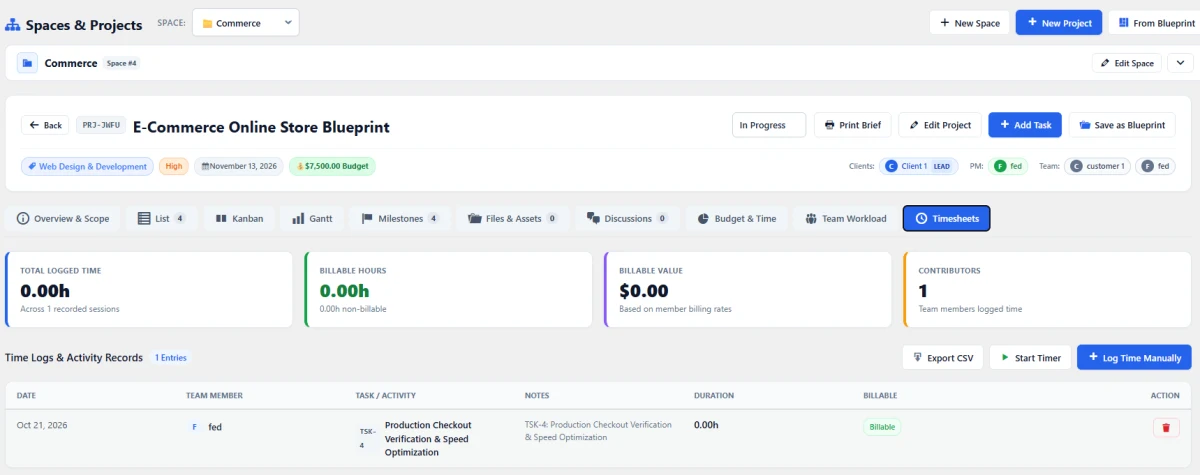
The Timesheets & Billable Valuation Center transforms recorded hours into transparent financial intelligence. Accessible directly within each Project Workspace alongside Gantt and Kanban views, this dashboard provides managers with audit-ready records of team hours, billable balances, and financial productivity metrics.
- Executive Financial KPI Cards: Real-time summary tiles showing Total Logged Time, Billable vs. Non-Billable Hours, total Billable Value ($) computed from team member hourly rates, and active Contributor Counts.
- Granular Activity Log Registry: Detailed audit table logging Date, Team Member, Task/Deliverable association, Work Notes, exact Duration, and Billable Status flags.
- Flexible Time Entry Methods: Seamlessly toggle between live stopwatch capture and manual retroactive time entry with manager override capabilities.
- One-Click CSV Data Export: Export formatted time entries directly to CSV for streamlined client billing, payroll auditing, and spreadsheet analysis.
- Integrated Workspace Navigation: Switch effortlessly between Timesheets, Overview, List, Kanban, Gantt, Milestones, Files, and Team Workload tabs within the same project.
Free vs. Pro Feature Comparison
Explore capabilities by category. Click any category to expand or collapse details.
5-Level Hierarchy (Spaces ➔ Projects ➔ Milestones ➔ Tasks ➔ Subtasks)
Multi-Tenant Spaces Partitioning (Client / Department Isolation
Dedicated High-Performance Relational Database (No CPT Bloat)
Reusable Project Blueprints & 1-Click Templates
Automated Blueprint Task & Milestone Duplication
Responsive Task List View with Subtask Accordions
Multi-Tenant Card Portfolio View
Tabular Project Registry with Status Badges
Interactive Drag-and-Drop Kanban Task Board
Interactive SVG Gantt Chart Timelines & Roadmap Zoom
Persistent Floating Live Stopwatch Timer
Task & Project-Level Session Time Binding
Weekly & Monthly Invoicing Timesheet Center
Billable vs. Non-Billable Hour Categorization
Member Hourly Rate Financial Valuation ($)
One-Click Timesheet & Activity CSV Export
Searchable Team & Assignee Selection Widget
Weekly Team Capacity Rollup Tiles
Interactive Resource Utilization Heatmap
Over-Allocation & Burnout Detection Alerts
Cross-Project Workload Balancing
Project File & Media Asset Uploads
Formal Client Sign-Off & Approval Workflows
Digital Audit Trail (Logged IP, Timestamps & Revisions)
File Iteration Versioning (v1, v2, Final)
Milestone Acceptance Gating
Client-Facing Floating Live Support Widget
Staff Live Chat Command Inbox & Queue Filters
1-Click Live Chat to Support Ticket Conversion
1-Click Support Ticket to Project Task Escalation
Dedicated Customer Support Portal (Shortcode & Block)
SLA Tracking & Urgent Breach Countdown Indicators
Canned Responses & Templated Support Shortcuts
Executive Telemetry & Performance Dashboard
Task Completion Velocity (%) & Pipeline Radar
Upcoming Milestones & Deadlines Radar
Dynamic Global vs. Space Scope Filtering
Total Project Budget Tracking vs. Logged Spend
Role-Based Permissions & Capability Matrix
Deadline Constraint Scheduling Guard
Frontend Dashboard (FED) Native Integration Bridge
WordPress Shortcode & Gutenberg Block Embedding
Real-Time Notification Center Flyout & Floating Bell
Changelog & Release Notes
Transparent release cycle, continuous improvements, and detailed developer logs for WorkFuz Pro.
Changelog & Release Notes
Real-Time Releases
Instant updates, hotfixes & continuous delivery.
Developer Notes
Inspect migration guides, hooks & API changes.
Roadmap Sync
Transparent milestones and upcoming features.
Frequently Asked Questions & Knowledge Base
We host a comprehensive, searchable documentation portal with tutorials, troubleshooting guides, and answers to all common questions for WorkFuz Pro.
Instant Search
Search through categorized articles, setup guides, and FAQs.
Guides & Code
Copy-paste PHP snippets, block usage, and shortcode examples.
Direct Support
Get detailed troubleshooting and step-by-step assistance.
License Checkout
WorkFuz Pro