
MailFuz

About MailFuz
MailFuz — Enterprise Email Delivery & SMTP Infrastructure Engine for WordPress
Every WordPress site depends on reliable email delivery—for WooCommerce checkout receipts, user registrations, password resets, client invoices, and automated system alerts. Yet, out of the box, standard WordPress uses the legacy PHP mail() function, which is notoriously unreliable: emails land in spam folders, get silently dropped by hosting providers, or trigger fatal server timeouts during traffic spikes.
MailFuz re-engineers your WordPress email pipeline from the ground up. Operating as a drop-in replacement for the standard wp_mail() handler, MailFuz intercepts all outgoing emails and dispatches them through authenticated, high-deliverability SMTP infrastructure with military-grade AES-256-GCM credential encryption at rest.
Unlike bloated third-party SaaS wrappers that hold your data hostage on external servers, MailFuz is 100% self-hosted, lightweight, and privacy-first. All transmission audit logs, queue jobs, and connection transcripts remain strictly within your own WordPress database.
Why Choose MailFuz?
- Universal Email Interception: Zero code modifications required. Automatically routes emails generated by WordPress core, WooCommerce, Frontend Dashboard, and all major form builders (Contact Form 7, WPForms, Gravity Forms, Fluent Forms, Elementor Forms).
- Guaranteed Inbox Placement: Fixes SPF, DKIM, and DMARC alignment by connecting through authenticated SMTP servers (Google Workspace, Microsoft 365, Amazon SES, SendGrid, Postmark, Mailgun, or your custom cPanel/Plesk mail server).
- Cryptographic Data Security: Sensitive SMTP passwords and tokens are encrypted at rest using AES-256-GCM authenticated encryption tied to your unique WordPress security salts.
- Non-Blocking Asynchronous Queue: High-volume order receipts and notifications are offloaded to an asynchronous background worker, eliminating checkout checkout lag and web server timeouts.
- Complete Audit Trail & Telemetry: Inspect the exact status of every sent email, view real-time delivery success percentages, and diagnose connection errors with comprehensive SMTP handshake transcripts.
Key Features & Architecture
Discover what makes MailFuz unique, reliable, and developer-friendly.
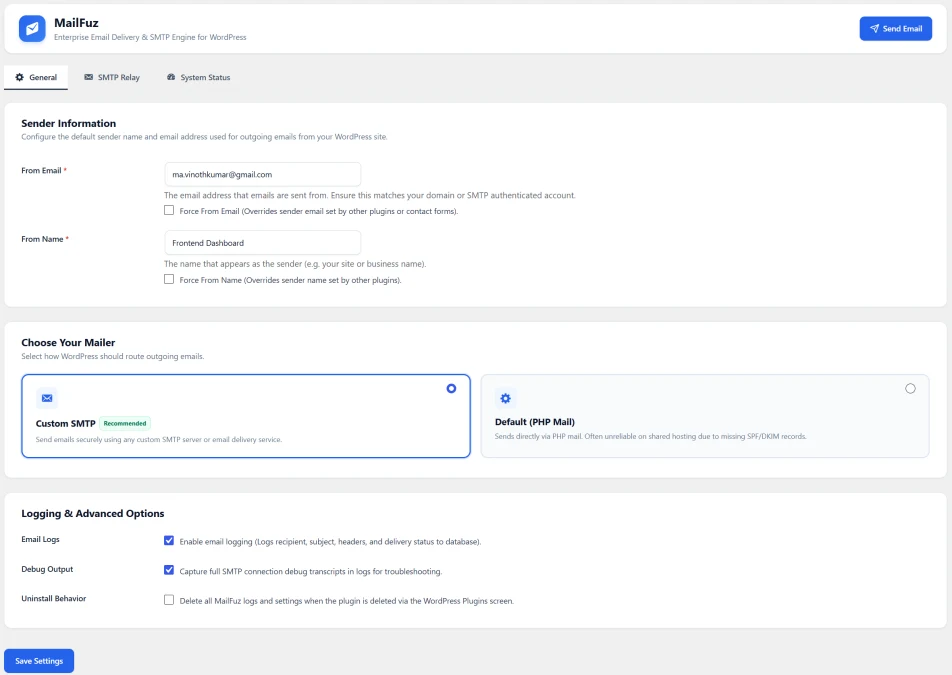
eamless Mailer Setup: Authenticated Encryption & Global Sender Controls
Configure your global email sender identity and transport protocol in one unified settings center. With toggleable mailer cards and granular logging switches, MailFuz makes enterprise setup straightforward and secure.
Key Features:
- Global Sender Enforcement: Define the default From Email and From Name for your site, with optional Force Override toggles to ensure brand consistency across all third-party plugins.
- Visual Mailer Selector: Toggle between Custom SMTP (Recommended) for authenticated deliverability and Default (PHP Mail) for simple testing environments.
- AES-256-GCM Credential Encryption: Passwords and API tokens are never saved as plain text in the database—credentials are encrypted at rest using your WordPress site's unique salts.
- Granular Telemetry Switches: Enable or disable database email logging and toggle verbose SMTP debug capture to keep your database lean.
- Clean Uninstallation Protocol: Optional setting to completely purge all MailFuz database tables and options if the plugin is uninstalled, ensuring zero database clutter.
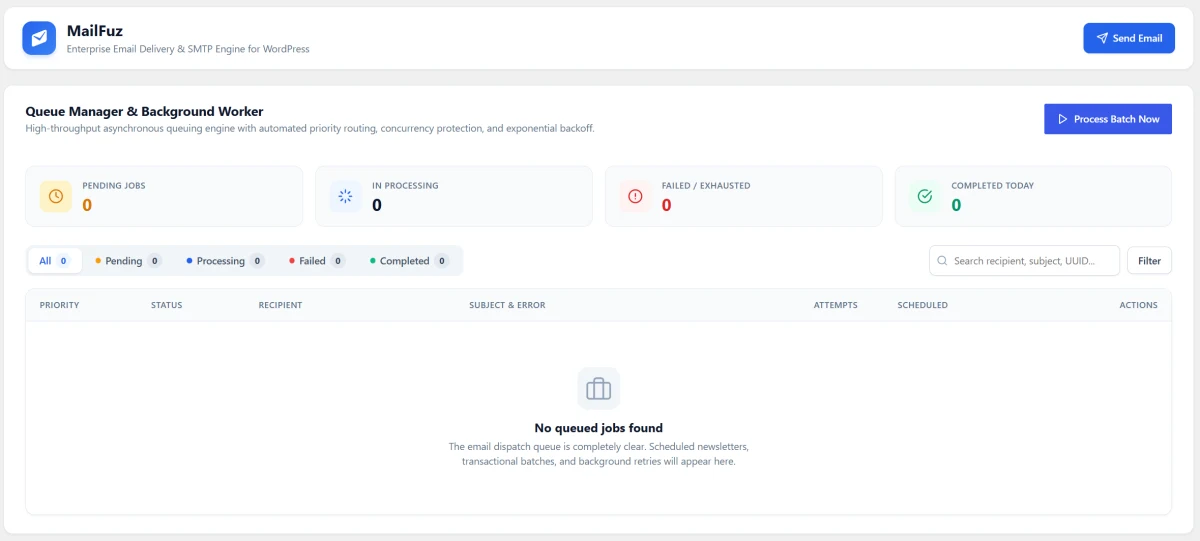
Asynchronous Queue Engine: Zero Checkout Lag & Reliable Delivery
When your site sends bulk order confirmations or notifications, waiting for a remote SMTP server to respond during a web request can freeze page loads. MailFuz’s Asynchronous Queue stores messages in a dedicated database table (wp_mf_email_queue) and delivers them in background batches.
Key Features:
- Non-Blocking Background Processing: Dispatches emails asynchronously, keeping WooCommerce checkouts and frontend forms lightning fast.
- Concurrency Protection & Distributed Locking: Prevents duplicate sends by locking processing jobs with unique worker IDs and expiry timestamps.
- Automated Exponential Backoff: Failed transmissions are automatically rescheduled with smart retry delays rather than being discarded.
- Queue Lifecycle Tracking: Real-time KPI counters for
Pending Jobs,In Processing,Failed / Exhausted, andCompleted Today. - Manual "Process Batch Now" Action: Instantly claim and deliver queued jobs with live progress feedback from the admin screen.
- Native WP-CLI Support: Integrate with server cron jobs via
wp mailfuz queue process --batch-size=50for true enterprise-scale throughput.
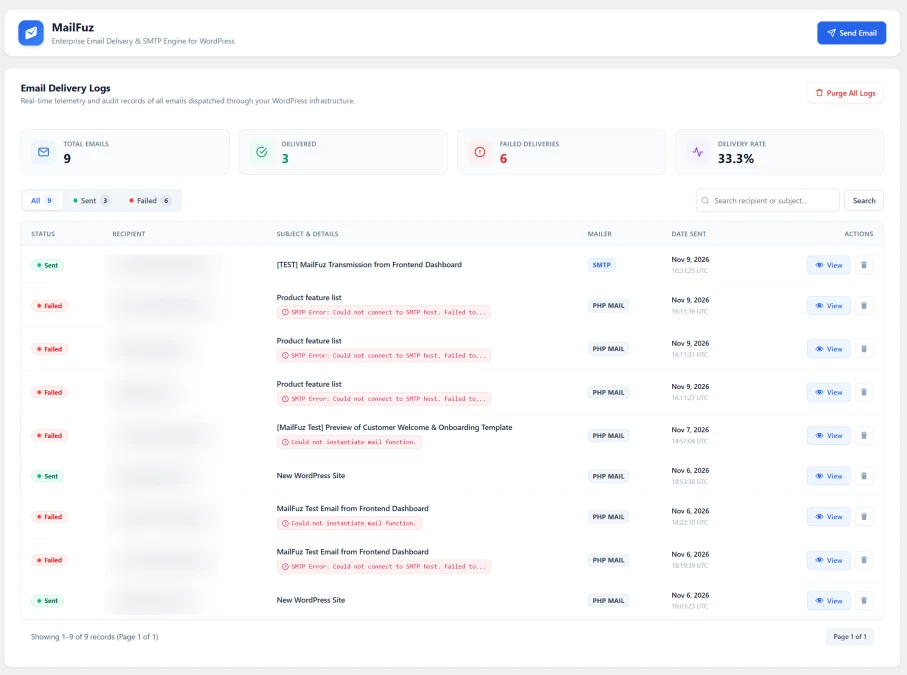
Detailed Email Audit Logs with Live Delivery Rate Telemetry
Eliminate the mystery of "missing emails." MailFuz records an authoritative local ledger of every email generated by your WordPress site. Search recipients, analyze delivery success percentages, and diagnose exact failure reasons in seconds.
Key Features:
- Performance Telemetry Strip: Displays high-level analytics for the current dataset: Total Emails, Delivered Count, Failed Deliveries, and overall Delivery Success Rate %.
- Segmented Status Filters: Filter between
All,Sent, andFailedmessages with one click to quickly isolate deliverability bottlenecks. - Inline Error Diagnostics: Failed rows display the exact SMTP or server error message (e.g., SMTP Error: Could not connect to host, Authentication failed).
- Search & Pagination: Fast search bar to look up specific recipients or subject keywords across thousands of indexed records.
- Transmission Inspector Modal: Click "View" to open an in-depth drawer showing full RFC 822 transmission headers, client IP, and debug output.
- One-Click Log Purge: Securely clean historical records with an irreversible confirmation dialog when database optimization is needed.
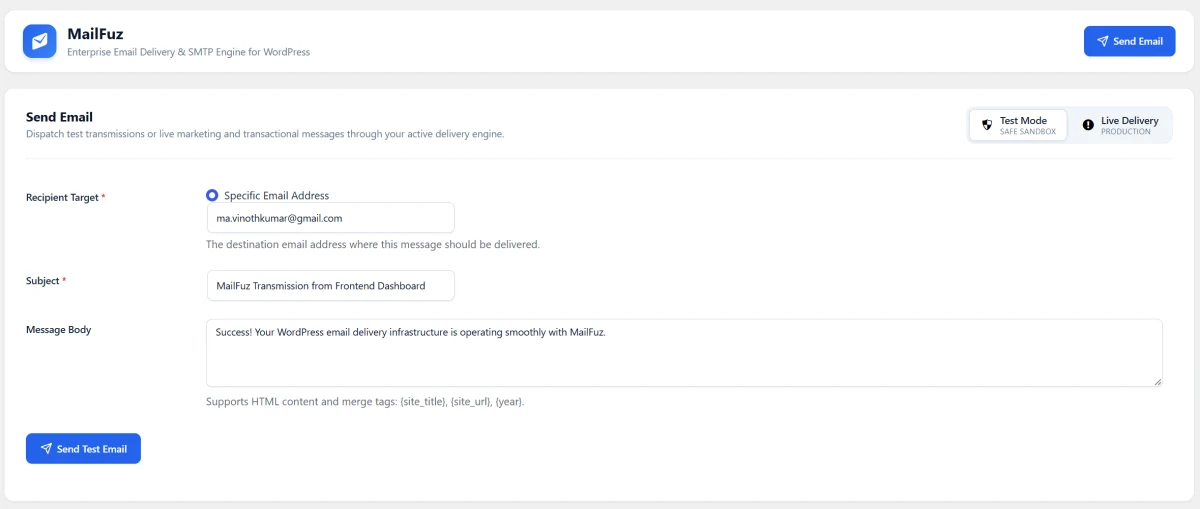
Send Test Email: Live Transmissions & Safe Sandbox Verification
Never deploy an untested mail server to production. MailFuz provides a dedicated email testing environment that allows administrators to verify server connectivity, test inbox formatting, and debug SMTP handshakes before going live.
Key Features:
- Targeted Recipient Routing: Dispatch test messages directly to any custom email inbox to verify spam filtering and mailbox placement.
- Dual Execution Modes:
- Test Mode (Safe Sandbox): Verify SMTP authentication and server handshakes without triggering production hooks or marketing workflows.
- Live Delivery (Production): Execute immediate, real-world transmissions through your active mail transport.
- Rich Content & Merge Tags: Supports full HTML body rendering and built-in dynamic merge tags (
{site_title},{site_url},{year}). - One-Click Live Feedback: Trigger test sends with instant visual loading spinners and clear success/error notices.
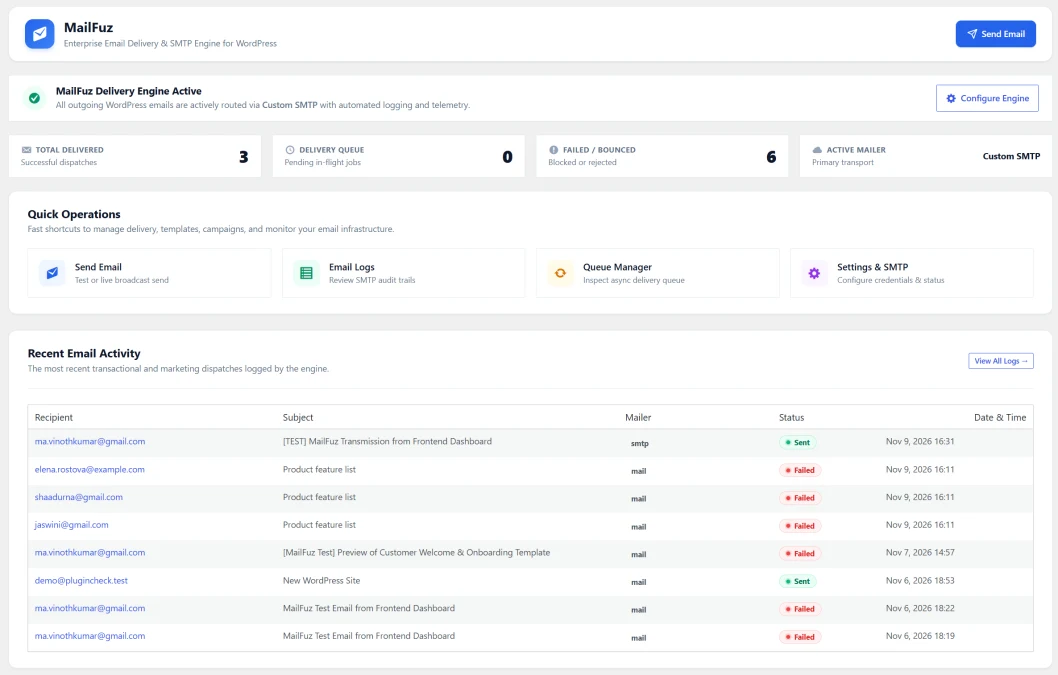
Mission Control: Real-Time Engine Health & Delivery Status at a Glance
Gain immediate, bird's-eye visibility into your WordPress site's entire email infrastructure. The MailFuz Dashboard provides an active engine status banner, instant delivery KPIs, one-click shortcuts to critical tools, and a real-time audit ledger of recent email dispatches.
Key Features:
- Active Engine Pulse Indicator: Instant visual confirmation that your primary SMTP transport is online and handling outgoing traffic.
- Core Delivery Metric Cards: Track cumulative dispatches in real time:
- Total Delivered: Count of successfully received emails.
- Delivery Queue: In-flight background jobs awaiting worker processing.
- Failed / Bounced: Instant detection of blocked or rejected transmissions.
- Active Mailer Tag: Confirms the currently engaged delivery transport (e.g., Custom SMTP, PHP Mail).
- Quick Operations Navigation: Fast-action shortcuts to Send Email, inspect Email Logs, manage the Queue, and update SMTP credentials.
- Live Recent Activity Feed: Review recent outbound emails with recipient address, subject, transport protocol, delivery status pill, and exact timestamp.
Release Notes & Version History
Transparent release cycle, continuous improvements, and detailed developer logs for MailFuz.
Release Notes & Version History
Follow every update, improvement, and new release for Our Plugin. View comprehensive release notes, upcoming roadmap features, and detailed developer logs on our dedicated changelog hub.
Real-Time Releases
Instant updates, hotfixes & continuous delivery.
Developer Notes
Inspect migration guides, hooks & API changes.
Roadmap Sync
Transparent milestones and upcoming features.
Frequently Asked Questions & Knowledge Base
We host a comprehensive, searchable documentation portal with tutorials, troubleshooting guides, and answers to all common questions for MailFuz.
Instant Search
Search through categorized articles, setup guides, and FAQs.
Guides & Code
Copy-paste PHP snippets, block usage, and shortcode examples.
Direct Support
Get detailed troubleshooting and step-by-step assistance.
License Checkout
MailFuz